

To tailor a resume to a job description without rewriting it by hand, run your existing resume and the job posting through a tool that trims the resume to fit the role. It should show you exactly what it removed and why, and let you approve every change before you send it. I built Resume Prune to do that, because I wanted the same rules applied the same way on every application, with nothing invented and nothing hidden.
Quick disclosure before we go further: Resume Prune is mine. I built it and I run it, and there’s a paid version. This is still me showing you the tool I actually use when I apply for things, not a pitch.
What follows is why it exists, and the parts I’d flag before you try it.
I was already tailoring my resume to job descriptions with AI. It kept going sideways.
Before Resume Prune, I tailored my own resume with a plain custom GPT. Paste the resume, paste the job description, ask it to make them fit. It worked well enough to keep doing it, and badly enough to bug me every single time.
I love building things. So rather than fight the same four problems on every application, I made my own fix that handles them the same way every time.
Problem 1: Same input, different resume every run
I’d give the GPT the same resume and the same job posting twice and get two different resumes. Different bullets, different order, different length. There was no consistency, so I could never trust that it was making the choice I wanted. It was making a choice.
Resume Prune runs on fixed rules. Same resume, same job, same result. It sticks to the job in front of it and leaves your history alone.
Problem 2: It padded and invented to hit keywords
Chasing keywords from the posting, the GPT would inflate on its own. A responsibility I touched once became a core skill. Software I opened twice turned into fluency. It was trying to be helpful, and it was putting things on my resume I couldn’t talk about in an interview.
Resume Prune only takes things away. It narrows your resume to what fits the job. It doesn’t add experience you don’t have, because the fastest way to lose an interview is to get asked about a line you can’t back up.
Problem 3: I couldn’t see what changed
The GPT handed me a finished resume with no idea what it dropped. I’d scan it, get nervous, and paste both copies side by side to compare them myself. That defeated the point.
This is the part I care about most, so it’s the feature I lead with. Resume Prune lists what it removed, and why, right next to your tailored resume, so you can check each decision yourself.
Problem 4: Bloated bullets and no length discipline
Left alone, the GPT wrote bullets as long as paragraphs and cover letters that ran forever. I wouldn’t read that either.
Resume Prune enforces caps. Bullets stay tight, cover letters stay at three short paragraphs, and the resume stays within two pages. A busy hiring manager can skim it.
How does Resume Prune show you what it cut?
It gives you a list. Paste a resume and a job posting, and next to your tailored resume you get every bullet it removed with the reason beside it. Think too senior for this role, not relevant to this job, or a repeat of a stronger bullet above. If you try one thing, try this.
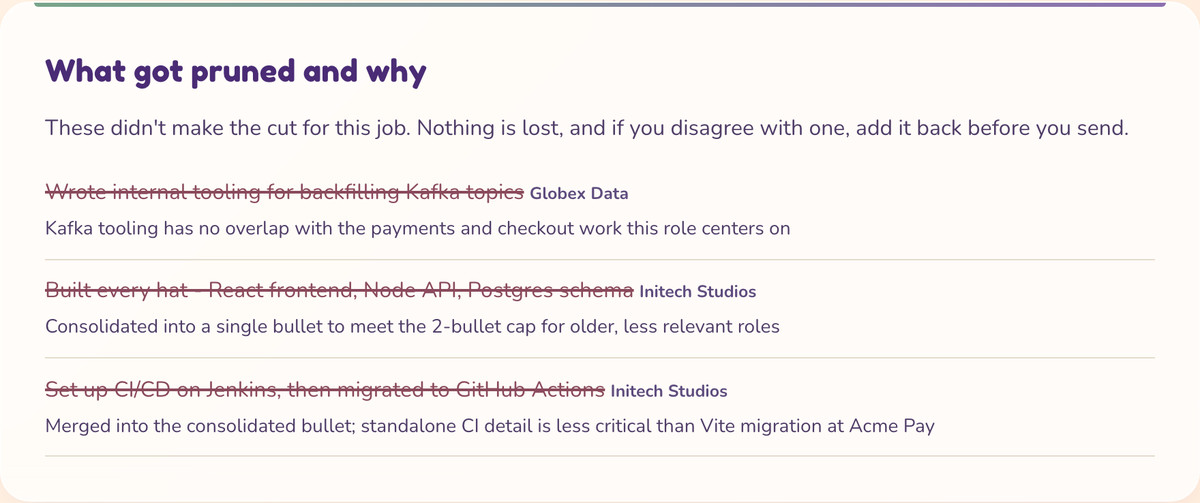
Restore any bullet you want back, and the AI has still saved you the tedious part. You keep the final say.
What else does Resume Prune do?
It also scores how well you fit, helps fill gaps, publishes a resume link, tracks applications and drafts cover letters. I added each one because I wanted it for my own hunt.
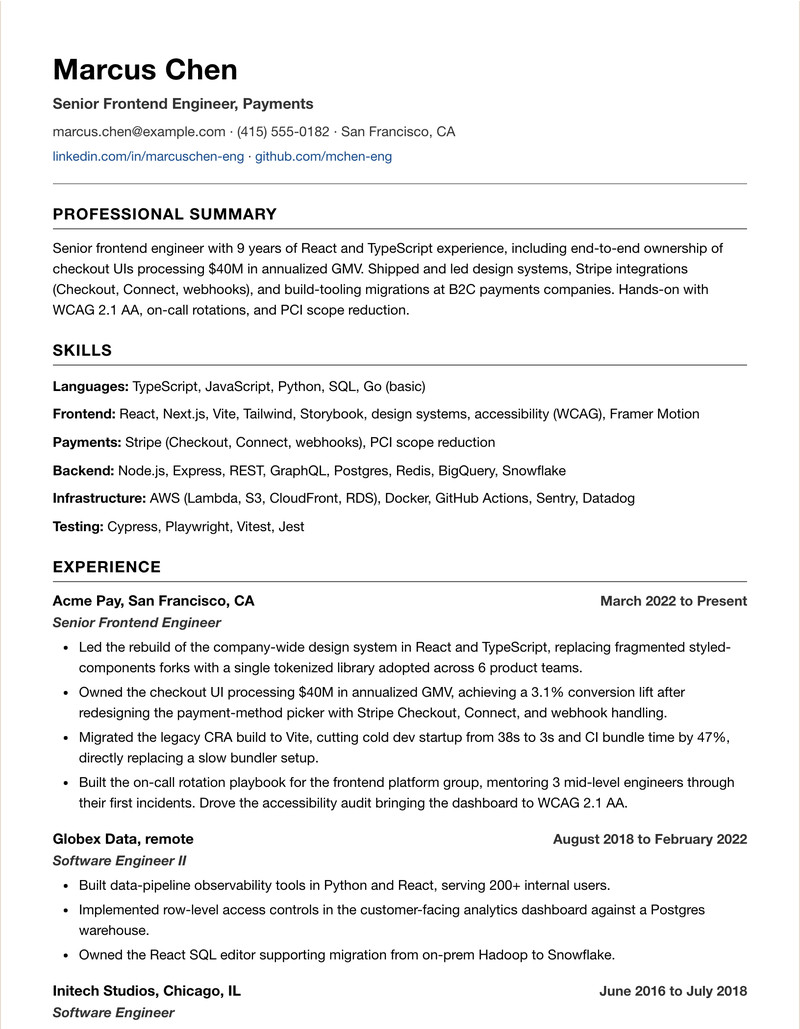
A match score. Every tailored resume gets a 1 to 10 score against the posting, so I can tell at a glance whether a role is a fit or a reach before I spend time on it.
Gap fill. When the score flags a requirement my resume doesn’t mention, I can describe what I did in a sentence or two, and it works that into a proper bullet. It only uses what you tell it.
A hosted resume link. On Sprint or Pro, I can skip the PDF and publish a tailored resume to a clean web page with its own link, so a hiring manager clicks a link in place of downloading an attachment.
A hunt tracker. The part that keeps me sane. Every application moves through applied, interviewing, and offer, so I’m not digging through my inbox trying to remember who I heard back from.
Cover letters. It drafts the cover letter from the same tailored resume and posting, held to the same caps.
The one thing I always tell people
Always read it before you send it. It’s AI. On a good day the edits are clean and the reasons make sense. On an off day it can reword a bullet a little generously, and you’re the one who has to defend that bullet in the room. Resume Prune puts the final check in your hands. Go through the reasons, fix whatever sounds off, then send it.
Before Resume Prune ever sees it, clean up your base resume. I made a scanner for that. Drop your resume in and it flags lines that can date you, eat up room or share more than an employer needs, with a fix idea for each one. It runs in your browser, so nothing gets saved or sent.
Who is Resume Prune for?
It’s for anyone applying to a lot of jobs who knows they should tailor each resume and can’t face doing it by hand every time. If you’ve ever sent the same generic resume to fifteen postings because customizing all fifteen felt impossible, this closes that gap. Tailor each one in a couple of minutes, see what came out, and keep control. Finding the jobs is its own chore. I handed that part to Claude, and I wrote up how I have AI search jobs for me every week on jen8n.
How much does Resume Prune cost?
The free tier gives you 2 tweaks a month. After that it’s Sprint at $9 a week or Pro at $14 a month. One tweak covers one job posting from start to finish.
| Plan | What you get |
|---|---|
| Free | 2 tweaks a month, no signup and no card. Enough to run your real resume through it and see the cuts. |
| Sprint, $9/week | 20 tweaks a week. For an active stretch of applying, and you can cancel it once the hunt’s over. |
| Pro, $14/month | 40 tweaks a month. Same features as Sprint, steadier pace, billed monthly instead of weekly. |
Try it on your own resume
The fastest way to judge it is to give it your own resume and a job you want, then look at what it took out. Start with the free sample. Two tweaks, no card needed.
If you want more of my origin-story builds, there’s the link-in-bio fix I made after hitting the same problem over and over. There’s also the Chrome extension that prints recipes in a grid I can follow, and the rest live in Digital Products.
FAQ
How do you tailor a resume to a job description?
Start from the resume you already have, trim whatever the role doesn’t need, and keep the experience that fits the posting. You don’t rewrite from scratch. Resume Prune does the trimming for you and shows what it removed so you can approve it.
Does Resume Prune make up experience I don’t have?
It’s set up not to. It can only rephrase, reorder and trim what’s already on your resume. If the job wants something you’ve done but never wrote down, the gap-fill step turns your own description of it into a bullet. AI can still word things a bit generously, which is why you review every change before anything goes out.
Is there a free version of Resume Prune?
Yes. The free tier gives you 2 tweaks a month with no signup and no card, enough to try it on your own resume before you pay for anything.
What’s the difference between Sprint and Pro?
The features are the same. The difference is how many tweaks you get and how often you’re billed. Sprint is $9 a week for 20 tweaks a week, made for a short, heavy stretch of applying, and you can cancel it the moment the hunt’s over. Pro is $14 a month for 40 tweaks a month, for a steadier hunt.
Can I share my resume as a link instead of a PDF?
Yes, on Sprint or Pro. You can publish a tailored resume at its own hosted link and send that in place of an attachment.
Is the tailored resume ATS-friendly?
Yes. It comes out as a single-column, two-page resume in selectable text with standard section headings, the layout applicant tracking systems parse without trouble. It skips graphics, tables and text boxes.
A tool I built
Resume Prune
You don’t need a new resume, you need to prune the one you have. Paste a job description and get back a matching resume and cover letter.
Prune your resume →I run an affiliate program on the tools I build. Approved affiliates earn 20% on what their referrals pay, for up to a year. US only for now. See the program →