


The simplest way to stop paying for subscriptions you forgot about is to write down every one you’ve canceled, keep a short list of the ones you’re thinking about canceling, and set a reminder before each renewal date. I built Subscription Graveyard to do all three. Canceled subscriptions become tombstones with a running savings total, and the Pro plan emails you before anything renews so you can cancel it or call for a better price.
Quick note first: Subscription Graveyard is my app. I built it and I run it. The main app is free, and the renewal reminders are part of a Pro plan I’ll get to below. There are no affiliate links in this post.
- What it does: Tracks the subscriptions you’ve canceled, what each one has saved you, the ones you’re on the fence about, and (with Pro) when the live ones renew.
- Best for: Anyone paying for a pile of apps and streaming services who loses track of renewal dates.
- Not for: Anyone who wants an app to find subscriptions on its own or cancel them for you. You type everything in.
Why forgotten subscriptions keep billing you
It’s so easy to let months fly by and keep paying. Nothing reminds you. The charge is small, it lands on a card you don’t check every day, and next month it happens again.
A charge has caught me off guard many times. The worst one was a social media scheduler a few years ago. It renewed yearly, so a whole year’s price hit at once, and I had to go back and forth with them quite a bit to get it back. It’s a pain. If you’ve never gone through all of them at once, here’s how to audit your subscriptions in 10 minutes.
How I track canceled subscriptions and what they save
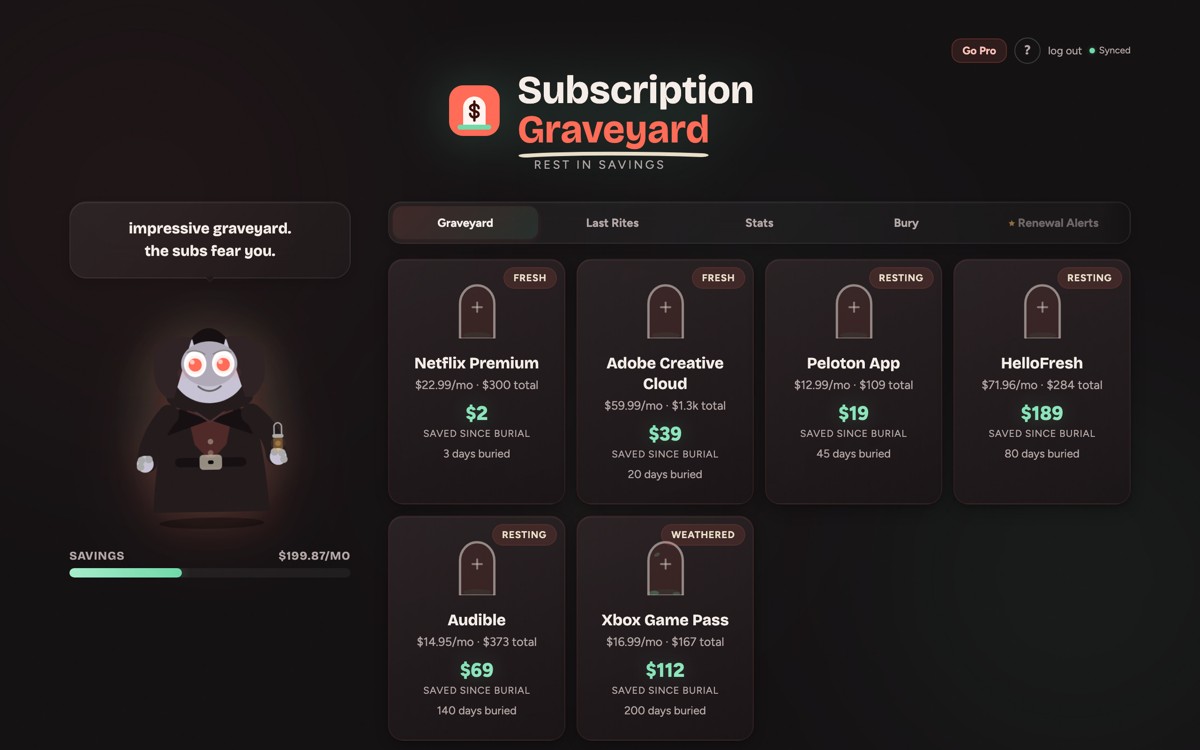
Canva, Toby, Nifty AI and Kindle Unlimited are all buried in my graveyard. Each one got a tombstone when I canceled it.
Burying one takes a name, the monthly cost and a category. There’s an optional cancel date, and it’s the field to fill in. Put in the real date and the app counts everything the subscription has saved you since then, even if you canceled it months ago. Leave it blank and it starts counting today.
Seeing the savings add up is my favorite part. The app shows two numbers. Monthly is what you’ve stopped paying each month. Total saved is everything the graveyard has saved since each burial, and it only goes up. Tombstones age from Fresh to Resting to Weathered to Legendary (a year or more, with ivy), and your rank climbs from Ghost to Grim Reaper as your monthly savings grow.
Planning what to cancel next with Last Rites
Last Rites is the waiting room for subscriptions you’re thinking about canceling. You add one with a note about why, and it sits there until you decide. When you cancel it, it moves over to the graveyard and starts counting.
Pilates is in my Last Rites because it’s so darn pricey. I don’t want to bury it, but it’s a rough one to keep at the price. I’m already in at founder’s pricing, so there’s no lower rate to ask for. It’s either pay it or cancel and start working out in the garage.
How do renewal alerts work in Subscription Graveyard?
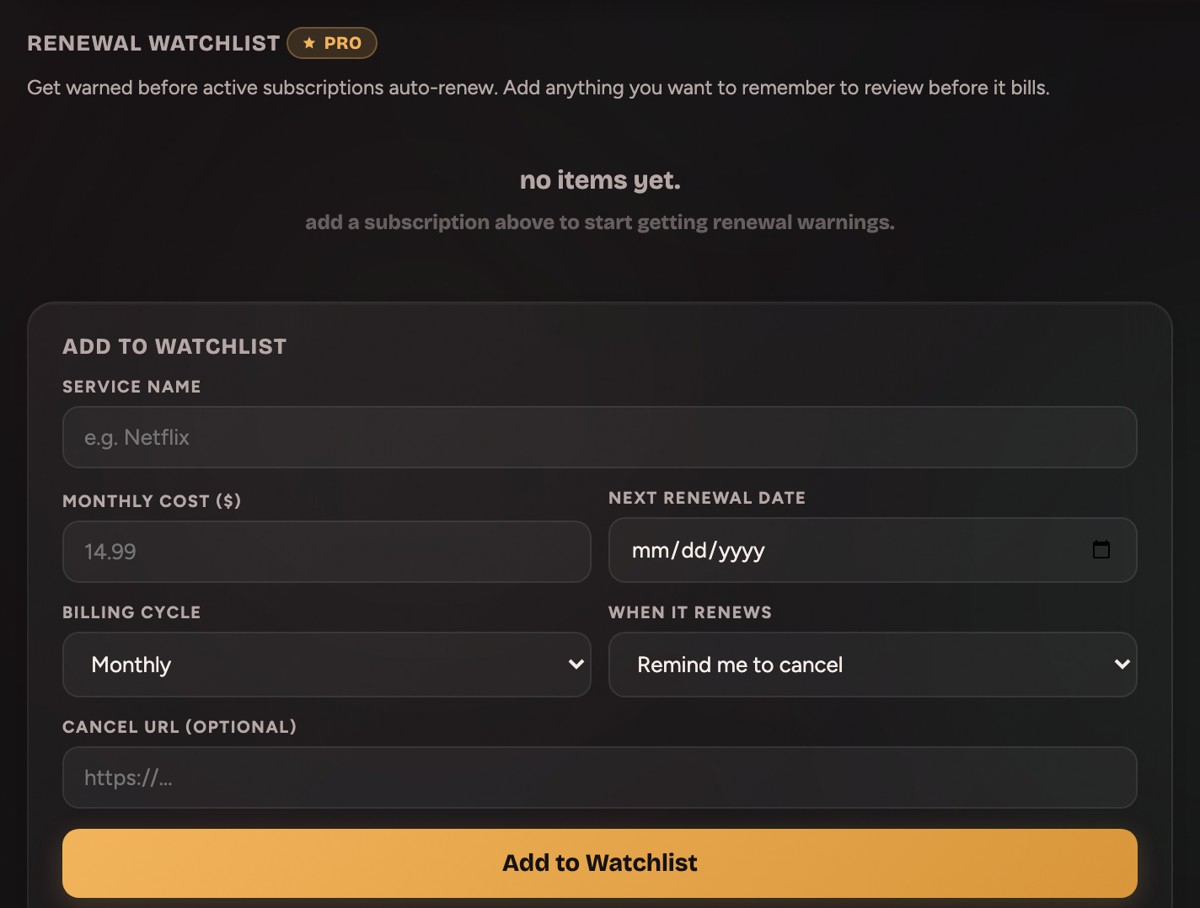
Renewal Alerts is the Pro feature, and it’s built for exactly this problem. You add an active subscription to the watchlist with its cost, next renewal date and billing cycle (weekly, monthly, quarterly or annual). Then you pick what you want to happen when it renews:
- Remind me to cancel if it’s done. You can save the cancel link with it, so you’re not hunting for the cancel button on the day.
- Remind me to negotiate a deal if you’d keep it at a lower price. The email comes with a short script for the call.
The warning emails go out 7 days before the renewal date and again 1 day before, while there’s still time to do something about it.
HBO Max is on my watchlist right now. We need to cancel it, but my husband always finds a show he needs to watch on it, so it ends up staying. At least the email shows up before the charge does.
Can you negotiate a subscription price instead of canceling?
Sometimes. YouTube TV gave me a discount for one month, and that’s the most recent one I’ve gotten. When I canceled Sirius, they offered me a lower rate to stay. I canceled anyway.
I haven’t called anyone in a while, and I’m way overdue. My impression is companies don’t offer these deals as often as they used to. It still only costs you one phone call to ask. And sometimes, like with my Pilates, there’s no lower price to find, so the only question is whether to keep it.
The script in the negotiate email goes like this:
- Call or chat with support and ask for the retention or cancellation department.
- Tell them your bill is coming up, you’re planning to cancel, and ask if they have any offers to change your mind.
- If they advertise a new-customer promo, ask for it as a loyal customer.
- Stay quiet and let them fill the silence with an offer.
- No deal? Follow through and cancel.
What’s free and what’s in Pro
| Feature | Free | Pro |
|---|---|---|
| Buried subscriptions | 5 | Unlimited |
| Last Rites | 5 | Unlimited |
| Savings counters, ranks and stats | Yes | Yes |
| Renewal alert emails | No | Yes |
| Negotiation script | No | Yes |
Pro is $7 a month, and one Pro plan covers all five apps in my App Hub, not only this one. Hitting 5 on the free plan doesn’t lock you out. You keep every counter you already have.
What Subscription Graveyard doesn’t do
It doesn’t connect to your bank, and it doesn’t cancel anything for you. You type in what you pay for and what you canceled. If you want an app to scan your statements and find subscriptions on its own, this isn’t it. To hunt down the ones you forgot by hand, Admin Arcade has a free printable tracker and the seven places subscriptions hide. The canceling and the phone calls are still on you. The app makes sure you remember to do them.
Subscription Graveyard FAQ
Does Subscription Graveyard connect to my bank?
No. There’s no bank connection and no card access. You add each subscription yourself by name and monthly cost.
Can I add a subscription I canceled a long time ago?
Yes. Enter the real cancellation date and the app counts everything it has saved you since then. Leave the date blank and it counts from today.
How early do the renewal alerts go out?
A week ahead, then again the day before it bills. Renewal alerts are part of Pro.
Is Subscription Graveyard free?
Yes. The free plan holds 5 buried subscriptions and 5 in Last Rites, with all the savings counters, ranks and stats. Pro removes those caps and adds renewal alerts.
What happens if I sign up for a subscription again?
Delete its tombstone. The savings it was counting come back out of your total.
If you’re paying for things you forgot about, Subscription Graveyard tracks what you’ve canceled for free, and Pro reminds you before the rest renew. Start with the ones you’ve already canceled, put in the real dates, and bury your first one.
Other apps I built
- The gamified savings app I built to keep an emergency fund
- How I tailor my resume to every job without rewriting it
- Why I stopped using bio link tools and built my own
A tool I built
Subscription Graveyard
Bury the subscriptions you’ve canceled, give each one a tombstone, and watch what you’re saving pile up.
Bury your first one →I run an affiliate program on the tools I build. Approved affiliates earn 20% on what their referrals pay, for up to a year. US only for now. See the program →