

Recipe Column Cards is a Chrome extension I built that prints any recipe page as one grid card: ingredients down the left, steps across the right, every ingredient sitting in the same row as the step it goes into. It’s free for 3 prints a month with no account, and Pro is $19 a year for unlimited prints. I cook from these cards, and this post is what that’s like, flaws included.
Full disclosure first: it’s mine. I built it, I sell it, and I make money when someone goes Pro. I’ll say it again later where the buying decision happens, but you should know it from paragraph two.
The format, in one look
I read 50+ books a year and recipe instructions still slide right out of my head. I’d get three steps in, look away to chop something, look back, and reread the same paragraph hunting for which of its six ingredients I hadn’t used yet.
My sister Shelley sent me an Instagram post with a recipe laid out as a grid, and we both loved it. She told me to make an extension out of it. The longer version, including who came up with the layout (not me), is on the About page.
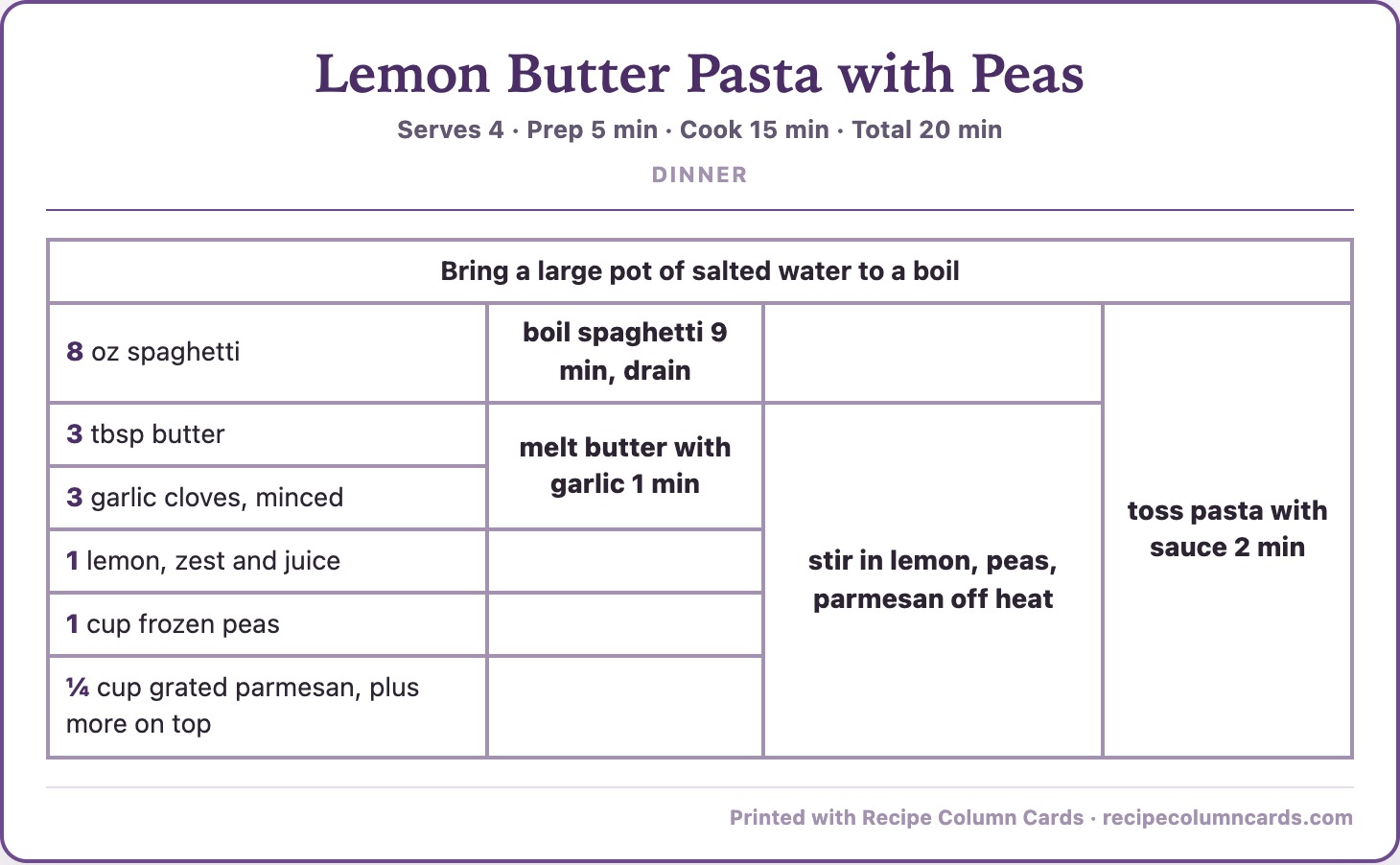
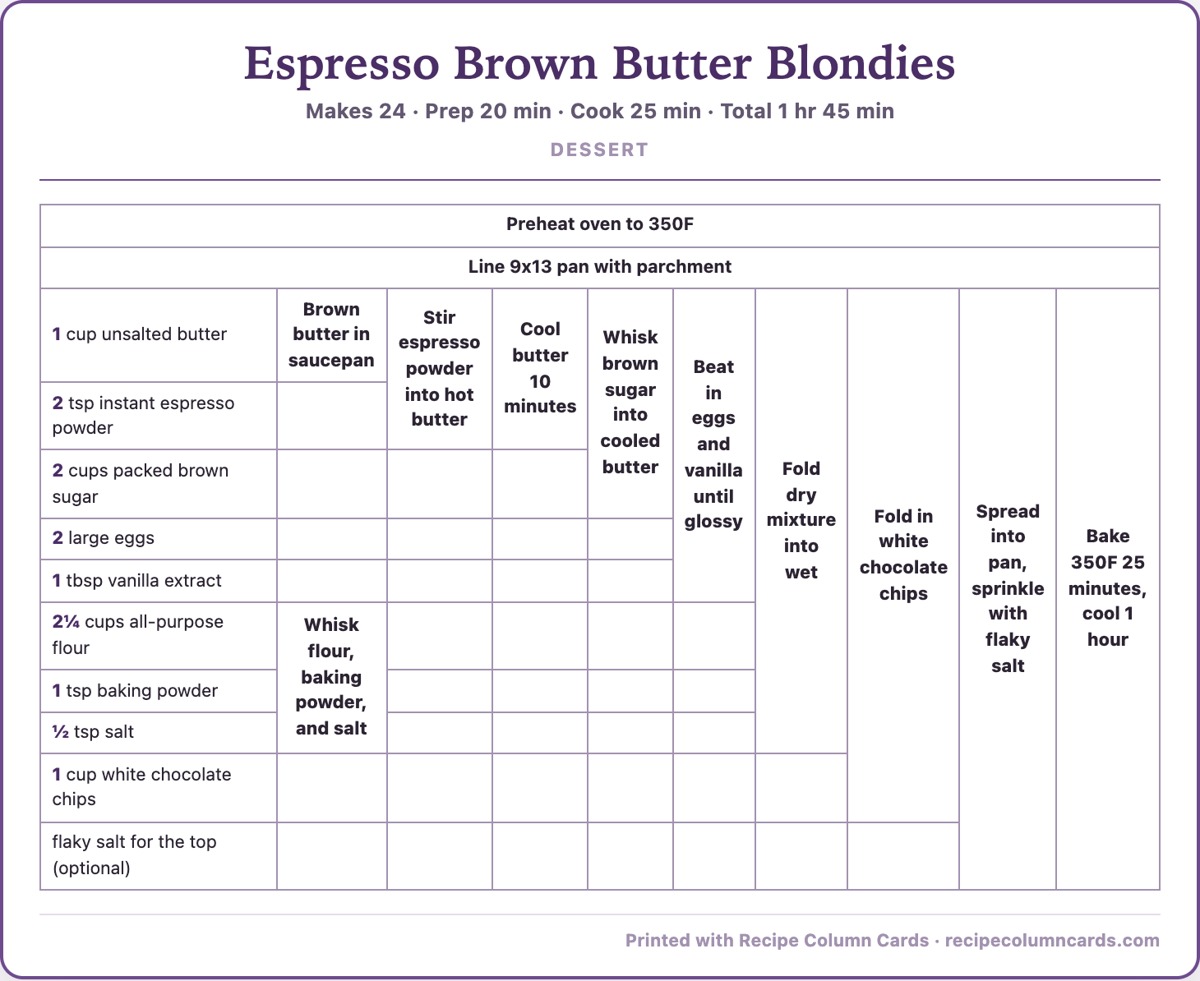
What you’re looking at: each ingredient gets a row. Each step gets a column. When a step uses three ingredients, its cell stretches down across those three rows. So “melt butter with garlic” is one box touching the butter row and the garlic row, and “stir in lemon, peas, parmesan” is the next box, covering those three rows. You read the recipe like a staircase, top left to bottom right, and you never have to ask “wait, did I add the peas yet?” Your eye is already on the peas row.
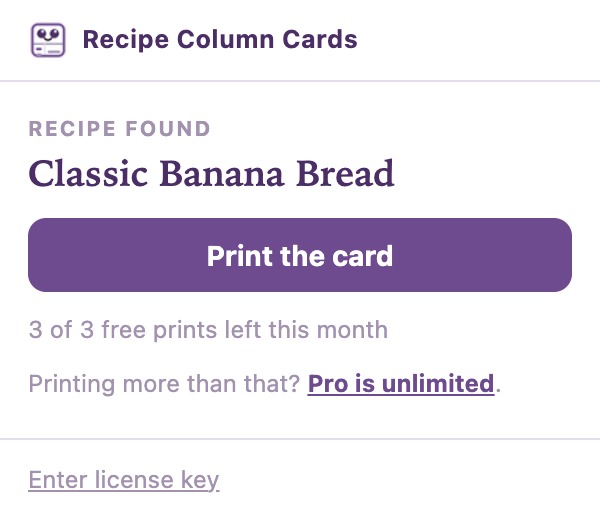
One click on a recipe page, the card builds, you print. No pasting, no retyping, no picking text off the page.
What is cooking from a grid card like?
I cook from these now, and the short version is that it’s a more peaceful experience for me. I’m not rereading. I glance down, find my row, keep going.
The best one so far was Downshiftology’s healthy hamburger helper. One pot, eleven ingredients, four steps, and every ingredient shows up in the order you use it. The card came out close to perfect: a clean staircase of four boxes, each one telling me exactly which new things go in the pan.
Then I made a creamy garlic salmon, and the card got vague in a few spots. That recipe has you sear the salmon first, take it out of the pan, build the sauce, then put the salmon back. A grid with one step per column doesn’t have a great way to say “cook this, remove it, come back to it later.” So the sear and the garlic ended up stacked in the same column, and the sauce steps stretched over ingredients already sitting in the pan. I still cooked from it. A few spots just weren’t as specific as I wanted, which is the thing I built it to fix.
So: one-pot, in-order recipes are where the card shines. Recipes where you cook the protein, pull it, make a sauce, and put it back are where it gets fuzzy. I’d rather tell you which is which than pretend every card is the hamburger helper.
Does it take traffic from food bloggers?
No, and as someone who ran a food blog for years, this matters to me more than the features do.
You’re on the blogger’s page when you click the button. Their page loads exactly as they published it, ads and all. The extension doesn’t strip anything, doesn’t republish the recipe anywhere, doesn’t save it to a server, and doesn’t let anyone read a recipe without visiting the site first. It reads the recipe data the page already publishes and prints it in a different shape for your own kitchen. The card even prints “From [their site]” along the bottom.
It’s the same thing as copying a recipe onto an index card. The recipe still lives on their site, and you had to go there to get it. It’s an alternate way to display a recipe on paper, and nothing more than that.
What I’d flag before you subscribe
It won’t work on every site. Roughly 1 page in 10 doesn’t publish standard recipe data. On those you get a friendly “couldn’t find a recipe” instead of a card, and it doesn’t use up a print. The big recipe sites and the large majority of food blogs work.
Big recipes make big grids. A 10-step recipe builds 9 step columns and prints landscape, shrunk to fit the page. It reads fine and the type stays big. It will not look like a cute index card, and I’m not going to pretend otherwise.
Cook-it, pull-it, put-it-back recipes get vague. See the salmon above. The builder maps ingredients to steps on its own, and on recipes where the same ingredient goes in, comes out, and goes back in, it sometimes groups things in a way you’ll have to read twice.
Two Pro features aren’t shipped yet. A recipe box of saved cards and custom card colors are on the way for Pro at no extra cost. Today, Pro gets you unlimited prints and no footer line on your cards. Don’t buy it for the recipe box until the recipe box exists.
It’s my product. Same as up top: I built it, I profit from it, and this post is a story and a pitch in the same breath.
Who is Recipe Column Cards for?
Look at one card. It either makes sense in your brain or it doesn’t, and you’ll know in about five seconds.
If you’ve ever lost your place in a recipe paragraph, or cooked with your finger on the page, this is for you. If recipes never lost you, the grid is a weird table and you can skip it. If what you want is a pretty two-column printable for a recipe binder, plenty of tools do that and this isn’t one of them.
If you cook off a screen instead of paper, the print dialog will save the card as a PDF, so you can keep it on your phone or tablet instead.
What does Recipe Column Cards cost?
| Plan | What you get |
|---|---|
| Free | 3 grid card prints a month, no account, no email. A small footer line on the card. |
| Pro, $19/year or $2.99/month | Unlimited prints, no footer line, license key by email (activate in one paste). The recipe box and custom colors are on the way at no extra cost. Annual works out to about $1.58 a month. |
Pro renews automatically until you cancel, and you cancel yourself at recipecolumncards.com/manage in one click. No emails, no phone calls. Pro runs through what you paid for, then you drop back to the free 3 prints. The cards you already printed are paper, and they’re yours.
Try it on tonight’s recipe
Recipe Column Cards prints any recipe page as one grid card, free for 3 prints a month or $19 a year for unlimited.
Install it, open the recipe you were going to cook anyway, click the card icon, and print. If it works on your brain the way it works on mine, you’ll know.
Add Recipe Column Cards to Chrome, free
Recipe Column Cards is a standalone product, separate from my App Hub apps. If you want more of my origin-story builds, here’s another tool I built to fix a problem I kept hitting, and the rest live in Digital Products.
A book I made
Haul to Sold
A take-along sourcing log for resellers. Write down what you paid at the garage sale or thrift store, then fill in what it sold for, the fees and the profit later.
Log your next haul →I run an affiliate program on the tools I build. Approved affiliates earn 20% on what their referrals pay, for up to a year. US only for now. See the program →
Related
- Cutluxe 8 Inch Chef Knife for Everyday Chopping and Slicing
- Oria Cook Glass Salad Bowl Set: Big Enough to Host
- The Daily Energy Log I Built to Find Out What Charges Me
FAQ
What is an engineered grid recipe card?
It’s a table where ingredients run down the left column and steps run across the top, and each step’s cell stretches down over the ingredients it uses. You see which ingredients go into which step at a glance, like a flowchart for the recipe. The layout has been passed around cooking forums for two decades. Recipe Column Cards prints one from any recipe page in one click.
Does Recipe Column Cards work on every recipe site?
No. It works on any page publishing standard recipe data, which covers the big recipe sites and the large majority of food blogs. Roughly 1 page in 10 doesn’t publish it, and on those you get a “couldn’t find a recipe” message instead of a card. A miss never uses up one of your free prints.
Does it strip ads or take traffic from food bloggers?
No. You’re on the blogger’s page when you click, the page stays exactly as they published it, and nothing is republished or stored. The extension only changes the shape of what comes out of your printer, and the card prints the source site’s name along the bottom. It’s an index card, not a copy of their site.
Can I save the card as a PDF instead of printing it?
Yes. When the print dialog opens, pick “Save as PDF” as the destination. You get the same grid card as a file you can keep on your phone or tablet.
How much does Recipe Column Cards cost, and can I cancel?
It’s free for 3 prints a month with no account. Pro is $19 a year or $2.99 a month for unlimited prints and no footer line. You cancel yourself at recipecolumncards.com/manage, and Pro runs through the period you paid for.