
Affiliate Disclosure: This post contains affiliate links, which means I may earn a commission if you make a purchase through links on this site, at no extra cost to you. As an Amazon Associate I earn from qualifying purchases.
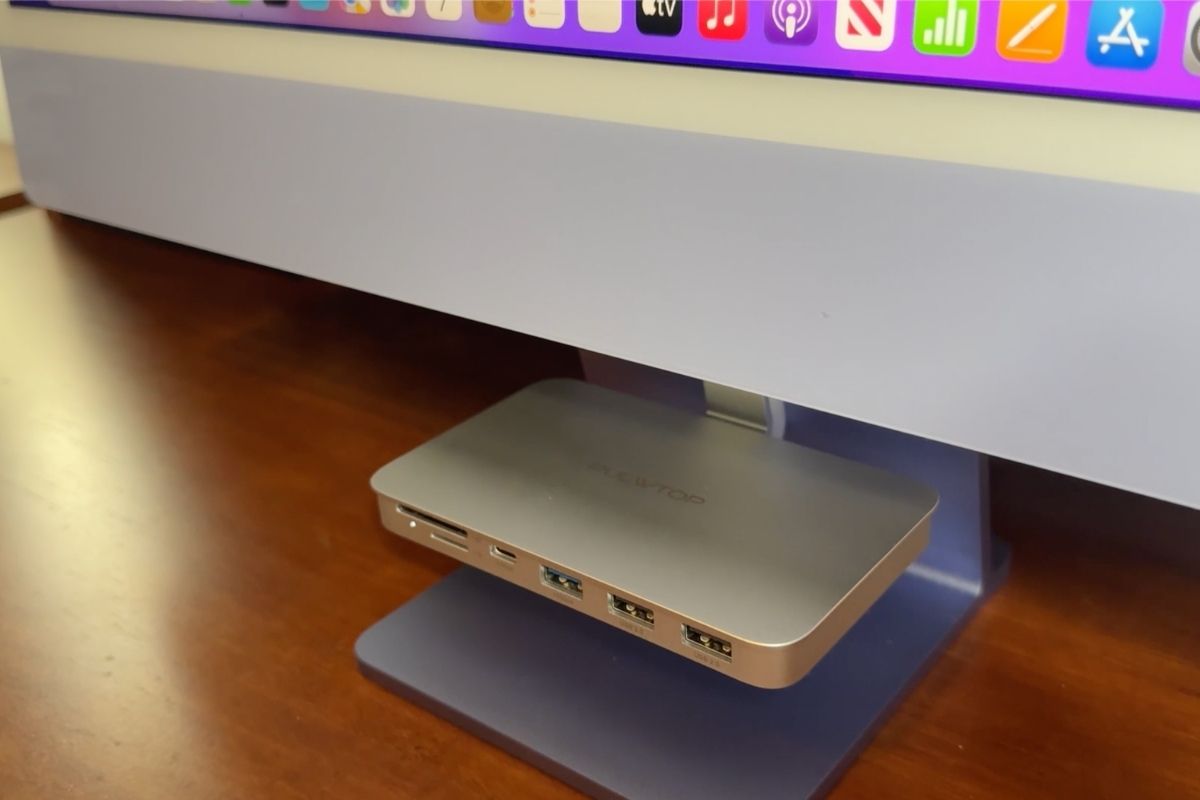
The PULWTOP iMac shelf hub mounts under the 24-inch iMac stand and brings a 10Gbps USB-C port, a 10Gbps USB-A port, two USB-A 2.0 ports, and SD and TF card readers to a shelf at the front of the screen. Install is plug-and-play with no drivers, and mine has been on my desk for over a year. It is data-only, so it will not charge a device or run a second monitor.
I’m about to install this iMac shelf hub I received for review, and I already knew why I wanted it. I’m so over having multiple adapters for the ports I need all hooked up behind my iMac.
This brings the ports to a little shelf right in front of you, so you’re not reaching behind the screen every time you need a USB or a memory card slot.
Quick Verdict
- Best for: people who are always plugging in USB drives, SD cards, or a mouse receiver and don’t want a bunch of adapters hanging off the back
- Skip it if: you need a hub that supports charging or video output
- My favorite feature: having SD and TF card slots right on the shelf
- Would I buy again? Yes
Is the PULWTOP iMac Shelf Hub a Good Buy?
Yeah, for me it was. The install was easy, it looks clean under the iMac stand, and I like having the ports right where I’m already sitting. And at the time of writing this, I’ve been using it for well over a year and I still love it.
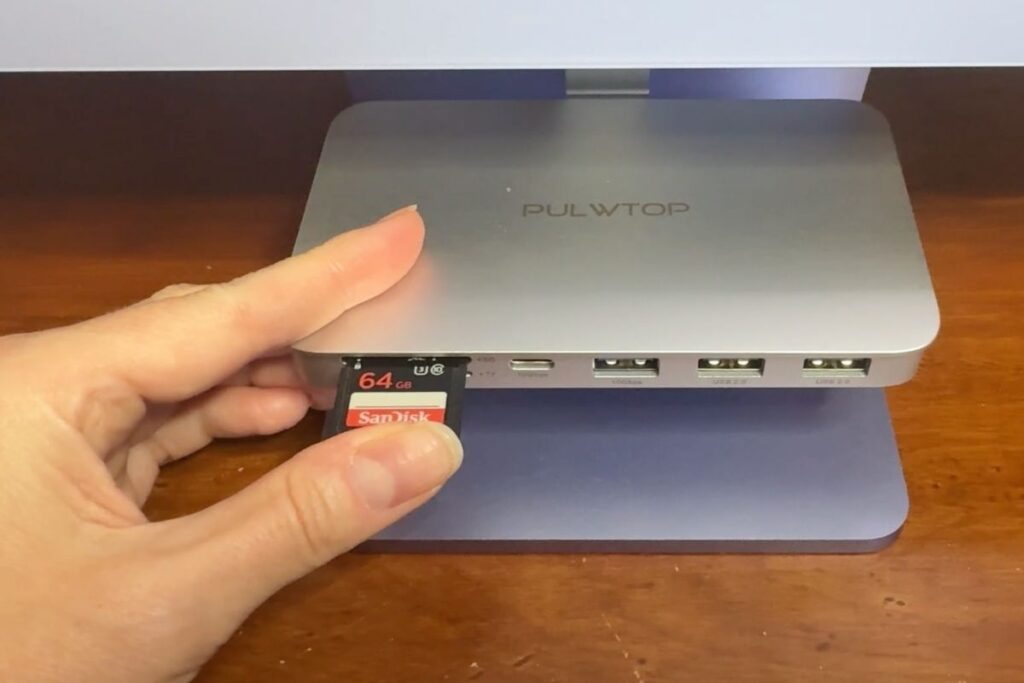
PULWTOP iMac Shelf Hub
This is best for people who want the ports they actually use brought to the front, without a pile of separate adapters living behind the iMac.
Just know it’s data-only. It won’t charge devices and it won’t do video out.
Key Details of This iMac USB-C Hub
| Brand | PULWTOP |
| What it is | A shelf-style USB-C hub that mounts under the iMac stand for front access |
| Port setup | USB-C 3.2 Gen2 (10Gbps), USB-A 3.2 Gen2 (10Gbps), two USB-A 2.0 ports, SD card reader, TF card reader |
| Speed | Up to 10Gbps on compatible USB-C and USB-A ports |
| Compatibility (per product info) | iMac 24-inch 2021/2023/2024 with tilt-only stand, and Studio Display 27-inch (tilt-only stand) |
| Install | Plug-and-play, no drivers |
| Colors | I got silver, and there are also blue and green options |
| Fit hardware | Includes two hook sizes, one for the 24-inch iMac and a larger one for the Studio Display |
| Important limitation (from product info) | Data-only, no charging and no video output |
Who Is the iMac Shelf Hub For?
If you’re constantly plugging in an SD card, a flash drive, or a mouse receiver, this makes life easier. It’s also nice if you want a cleaner look and you’re tired of dongles and cords hanging off the back.
What Did I Notice First?
It looks like it belongs there. It tucks under the stand instead of looking like a random accessory, and it doesn’t make my setup feel bulkier.

Which Features Matter Most Day to Day?
- SD and TF card slots: This is what I use the most. Pop a card in, import, done.
- Extra USB ports: I like being able to leave a receiver plugged in and still have open ports for random stuff.
- Hook options: It comes with two hook sizes, so you can match it to your stand.
- Data transfer: For my day-to-day use, everything has felt quick and normal. No weird lag.
How Does the iMac Shelf Hub Perform?
Install was easy. It slid in, it stayed put, and I didn’t have to fight my cords. And the longer I’ve used it, the more I appreciate the little stuff, like not having to get up and do the awkward reach-around every time I need a card reader.
What I Liked
- My SD and TF cards are easy to access
- Looks clean under the stand
- Gave me extra ports without a pile of adapters
- Has worked reliably for me long-term
What I Didn’t Love
- It’s data-only, so no charging and no video output
- You do need to make sure you have the right stand style, since it’s meant for tilt-only stands
What Are the Alternatives to the PULWTOP iMac Shelf Hub?
The two things this hub will not do are charge a device and send video to a second screen, and it only suits a tilt-only stand. If either of those is a dealbreaker, the hubs below cover the gap. I have only used the PULWTOP shelf hub, so these are described from their listings rather than from testing. Every pick in the table below links to Amazon.
| Hub | Video out | Storage slot | Reach for it if |
|---|---|---|---|
| PULWTOP iMac Shelf Hub (the one reviewed here) | No | No | You want front-facing ports and card slots, nothing more |
| PULWTOP 11-in-1 iMac Hub | 4K at 60Hz HDMI | M.2 NVMe enclosure | You want the second screen, wired ethernet, and storage in one piece |
| 8-in-1 iMac USB-C Hub with 4K HDMI | 4K HDMI | No | Video out is the only thing you are missing |
| PULWTOP iMac Hub with M.2 SSD Enclosure | No | M.2 NVMe enclosure | You would rather add drive space than a monitor |
All three list the same 10Gbps USB-C and USB-A speeds this one has, so the difference is what gets added on top rather than how fast the ports run. Check your stand style before you order any of them, since these mount under the iMac the same way and the fit depends on it.
Common Questions About This iMac USB-C Hub
Will it charge my phone or power devices?
No, these are data-only ports.
Will it output video to a monitor?
No. It does not support video output.
Will it fit my iMac?
Per the product info, it’s for iMac 24-inch models with the tilt-only stand (2021/2023/2024). It’s not for height-adjustable or VESA setups.
Is it fast?
It supports up to 10Gbps on the USB-C and one USB-A port. In my use, transfers have felt quick with no noticeable delay.
Does it run hot?
I didn’t notice heat issues in my use.
Would I Buy It Again?
Yes. I’ve been using it for well over a year now, and I still love it. It’s one of those small setup changes that you notice all the time if you use memory cards or plug things in often.
More Desk Setup Finds
- If you’re building out your desk, here’s the adjustable wood desktop bookshelf I actually kept.
- And for the aches that come with sitting at it all day, my neck and shoulder massager review.
Where to Buy
A tool I built
Dopamine Dealer
Track your habits and get a hit of dopamine every time you check one off. No willpower required.
Start your streak →I run an affiliate program on the tools I build. Approved affiliates earn 20% on what their referrals pay, for up to a year. US only for now. See the program →